TamboUI

making 2026 the Year of Java in the Terminal

Yes. We just Rickrolled Devoxx France.

Using Java in the terminal!

Speakers

Cédric Champeau

Cédric Champeau
Principal Engineer @ Oracle
GraalVM · Micronaut · Gradle
@CedricChampeau

Max Rydahl Andersen

Max Rydahl Andersen
Distinguished Engineer @ Red Hat
STSM @ IBM
JBang · Quarkus · Hibernate
@maxandersen

Java is everywhere

  • Running the world’s financial systems ✅

  • Powering Android ✅

  • Handling billions of transactions ✅

  • Building beautiful terminal tools…​

🦗

The terminal renaissance

  • AI tools live in the terminal

  • Developer workflows are CLI-first again

  • Go has Charm / Bubble Tea

  • Python has Textual/Rich

  • Rust has Ratatui

All written in…​ everything but Java.

The old excuses

  • "Java is too slow to start" → Java is fast, GraalVM even faster. Milliseconds.

  • "Too much ceremony" → JBang: one command, run anything.

  • "Distribution is a nightmare" → JReleaser: one command, everywhere.

  • "Too verbose!" → Modern Java disagrees.

Every excuse you’ve been telling yourself? Outdated.

Origin story

How TamboUI was born

What impresses me most with Claude is its command-line interface. Building interactive CLI interfaces with ANSI escape codes is usually a big pain. Any idea what it uses under the hood? The UX is quite fantastic.

Cédric Champeau (@melix.champeau.me) Dec 13, 2025

If go it’s charm, if python rich/textua, rust it’s ratatui

Max Rydahl Andersen (@maxandersen.xam.dk) Dec 13, 2025

6 days later…​

I am mind blown. I asked Claude to port Ratatui to Java, using Gradle, create a demo app and compile it to a native binary. It took 20 minutes. Here's the demo (this is a native binary compiled using GraalVM using the official native build tools plugin). 🫳🎤 /cc @glaforge.dev @maxandersen.xam.dk

Cédric Champeau (@melix.champeau.me) Dec 19, 2025

tamboui.dev

TamboUI logo
jbang demos@tamboui

The stack

Three layers, one stack

LayerWhat

High

Toolkit: Declarative, CSS, focus mgmt

Mid

TuiRunner: Managed event loop

Low

Immediate Mode: You own everything

Pick what fits your style. Or go all the way down.

The lower levels

Backend

Deal with the terminal directly. Escape sequences, raw mode, etc.

Backendjline3aeshpanama

Speciality

The usual

SSH & Web

Direct native access

Java

8+

8+

22+

Same API. Swap the backend. Works everywhere Java runs.

The backend contract

// All three backends implement the same Backend interface
try (var backend = BackendFactory.create()) {  // picks best available
    backend.enterAlternateScreen();
    backend.enableRawMode();
    backend.enableMouseCapture();
    // ...
    backend.leaveAlternateScreen();
}

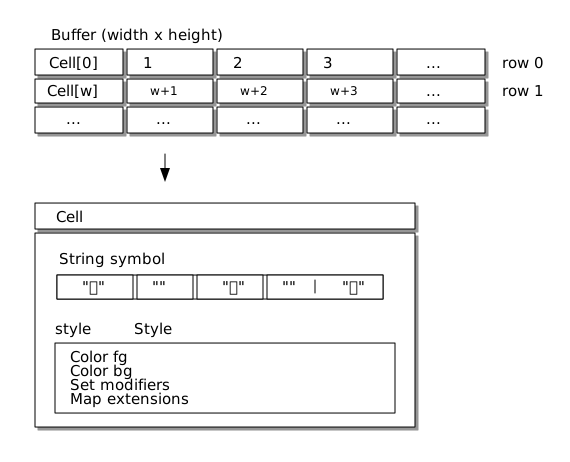
Buffer, Cell, Rect

// A Buffer is a 2D grid of Cells
var buffer = Buffer.empty(new Rect(0, 0, 80, 24));

// A Cell has a symbol and a Style
buffer.set(0, 0, new Cell("H", Style.EMPTY.fg(Color.RED).bold()));

// Rect: x, y, width, height, used everywhere for layout
var area = new Rect(10, 5, 60, 14);

Buffer → Cell → Style

buffer cell style

Emoji, Unicode & grapheme clusters

Yes, we support Unicode and grapheme clusters.

jbang unicode-demo@tamboui/tamboui
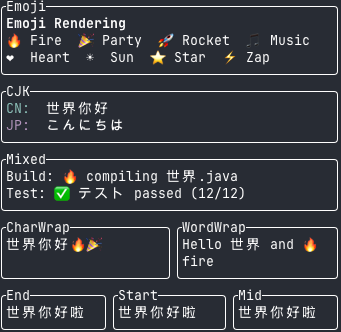
Unicode

jbang emoji-demo@tamboui/tamboui

Images

jbang image-demo@tamboui/tamboui

Seeing is believing!

  • Half-blocks

  • Braille

  • Sixel

  • Kitty

  • iTerm2

  • etc.

Immediate Mode: the raw loop

try (var tui = TuiRunner.create()) {
    tui.run(
        (event, runner) -> false,
        frame -> {
            var para = Paragraph.builder()
                .text(Text.from("Hello, TamboUI!"))
                .block(Block.bordered())
                .build();
            frame.renderWidget(para, frame.area());
        }
    );
}

Every frame: render everything, diff & push to terminal.

Is it fast enough?

jbang colors-rgb-demo@tamboui/tamboui

Every cell changes on every frame.

from 30 to 2000+ FPS on modern hardware/terminals.

Terminal IO is the bottleneck, not the JVM.

Widget

A widget is "something" that can be rendered to a terminal.

public interface Widget {
    void render(Rect area, Buffer buffer);
}

public interface StatefulWidget<S> {
    void render(Rect area, Buffer buffer, S state);
}

Widget Builders

Paragraph paragraph = Paragraph.builder()
    .text(Text.from("This is a paragraph of text that can wrap across multiple lines."))
    .overflow(Overflow.WRAP_WORD)
    .alignment(Alignment.LEFT)
    .block(Block.builder()
        .title("Description")
        .borders(Borders.ALL)
        .build())
    .build();

paragraph.render(area, buffer);

Build & Render.

Layout

Layout: constraints

var layout = Layout.horizontal().constraints(
    Constraint.percentage(30),   // sidebar
    Constraint.min(20),          // main content, at least 20 cols
    Constraint.length(10)        // fixed-width panel
);

var rects = layout.split(frame.area());

Flexbox-inspired. Responsive. No CSS headaches.

jbang rflex-demo@tamboui/tamboui

Mouse

Yes, terminals support mouse input, so does TamboUI.

jbang toolkit-demo@tamboui/tamboui

…​and more

Testing: AssertJ builders, Blackbox Pilot guided testing

Screenshots: Export buffer/rect to SVG, HTML, text, asciinema

TFX: animations, transitions, etc.

jbang tfx-demo@tamboui/tamboui

Higher level APIs

Lower level APIs are not what most people want to write.

  • Runner: event loop, resize handling, animation ticks, error handling

  • Toolkit: declarative UI, focus management

TuiRunner: what you stop writing

  • Poll / parse / dispatch event loop

  • Resize → debounced redraw

  • Tick events for animation, disabled when you don’t need them

  • Thread-safe runOnRenderThread + a managed scheduler

  • Pluggable RenderErrorHandler: crashes don’t wreck the terminal

The pieces every TUI framework rewrites badly. You get them once, right.

TuiRunner: the whole app

int[] count = {0};
try (var tui = TuiRunner.create()) {
    tui.run(
        (event, runner) -> switch (event) {
            case KeyEvent k when k.isQuit() -> { runner.quit(); yield false; }
            case KeyEvent k when k.isUp()   -> { count[0]++; yield true; }
            case KeyEvent k when k.isDown() -> { count[0]--; yield true; }
            default -> false;
        },
        frame -> frame.renderWidget(
            Paragraph.builder()
                .text(Text.from("Count: " + count[0]))
                .centered()
                .build(),
            frame.area())
    );
}

A complete, resizable, crash-safe counter app. ~15 lines of body.

Runner configuration

var config = TuiConfig.builder()
    .mouseCapture(true)
    .tickRate(Duration.ofMillis(16))        // ~60 fps
    .resizeGracePeriod(Duration.ofMillis(250))
    .bindings(BindingSets.vim())            // hjkl out of the box
    .errorHandler(RenderErrorHandlers.displayAndQuit())
    .build();

try (var tui = TuiRunner.create(config)) {
    tui.scheduler().scheduleAtFixedRate(
        this::pollBackend, 1, 1, TimeUnit.SECONDS);
    tui.run(this::onEvent, this::render);
}

scheduleAtFixedRate runs on the scheduler thread.
Use tui.runOnRenderThread(…​) to mutate UI state safely.

Toolkit: build apps, not plumbing

Declarative UI

  • Component based model

  • Automatic focus management (Tab / Shift+Tab)

  • Automatic event routing to the focused element

  • @OnAction handlers: bind keys without wiring

Toolkit: a complete app

public class CounterApp extends ToolkitApp {
    private int count = 0;

    @Override
    protected Element render() {
        return column(
            panel(text("Count: " + count).bold().cyan())
                .title("Counter").rounded().fill(),
            panel(text(" ↑/↓: change  q: quit ").dim())
                .rounded().length(3)
        );
    }

    @OnAction(Actions.MOVE_UP)   void inc(Event e) { count++; }
    @OnAction(Actions.MOVE_DOWN) void dec(Event e) { count--; }

    public static void main(String[] args) throws Exception {
        new CounterApp().run();
    }
}

Toolkit: composing a layout

@Override
protected Element render() {
    return column(
        header(),
        row(sidebar(), mainContent()),
        statusBar()
    ).fill();
}

private Element sidebar() {
    return panel(
        list("Inbox", "Sent")
            .highlightSymbol("> ")
            .focusable().id("nav")
    ).title("Folders").rounded().length(30);
}

CSS in the terminal

StyleEngine

Style your TUI like you style the web.

StyleEngine works with TuiRunner and Toolkit alike.

TCSS: the syntax

/* app.tcss */
.sidebar        { width: 30%; border-type: plain; border-color: green; }

#nav:focus      { border-type: double; border-color: cyan; }
#nav:hover      { background: #1e2838; }

.item:selected  { background: #005fd7; color: white; text-style: bold; }

Selectors, pseudo-classes, variables, etc.

jbang richtext-demo@tamboui/tamboui

Themes: load and switch at runtime

engine.loadStylesheet("dark", "/themes/dark.tcss");
engine.loadStylesheet("light", "/themes/light.tcss");
engine.setActiveStylesheet("dark");   // at runtime, live!

No recompile. No restart. Hot-swap live.

jbang css-demo@tamboui/tamboui

Combines with TFX!

jbang tfx-toolkit-demo@tamboui/tamboui

GraalVM

GraalVM native

./gradlew nativeCompile
./build/native/nativeCompile/myapp     # ~10 MB, starts in ms

TamboUI ships the GraalVM reachability metadata.
Zero config for reflection, resources, serialization.

Showcases

Imagine it - Make it

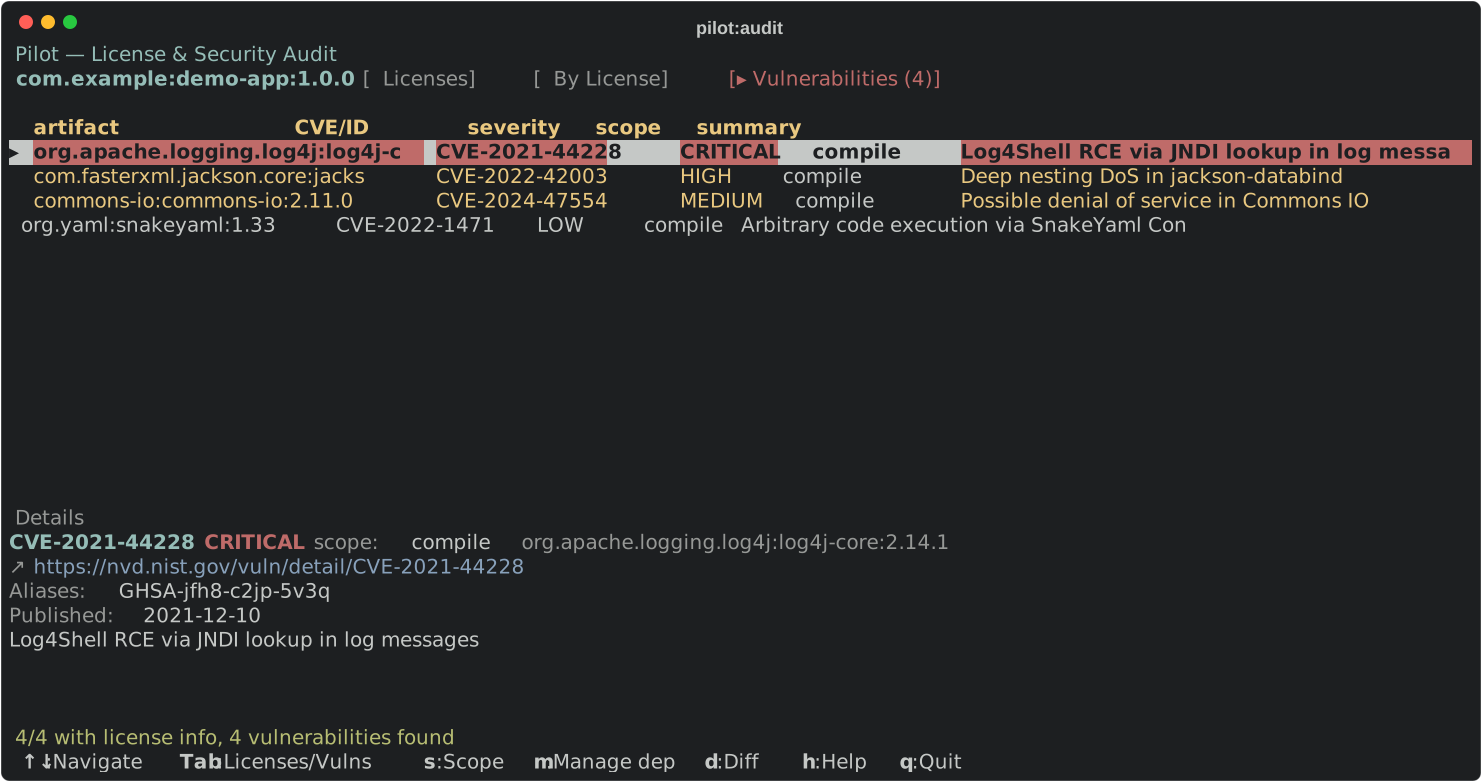
Pilot

Interactive TUI for Maven.

jbang pilot@maveniverse/pilot
  • Search, tree, updates

  • Audit licenses + CVEs

  • Edit pom.xml without leaving the terminal
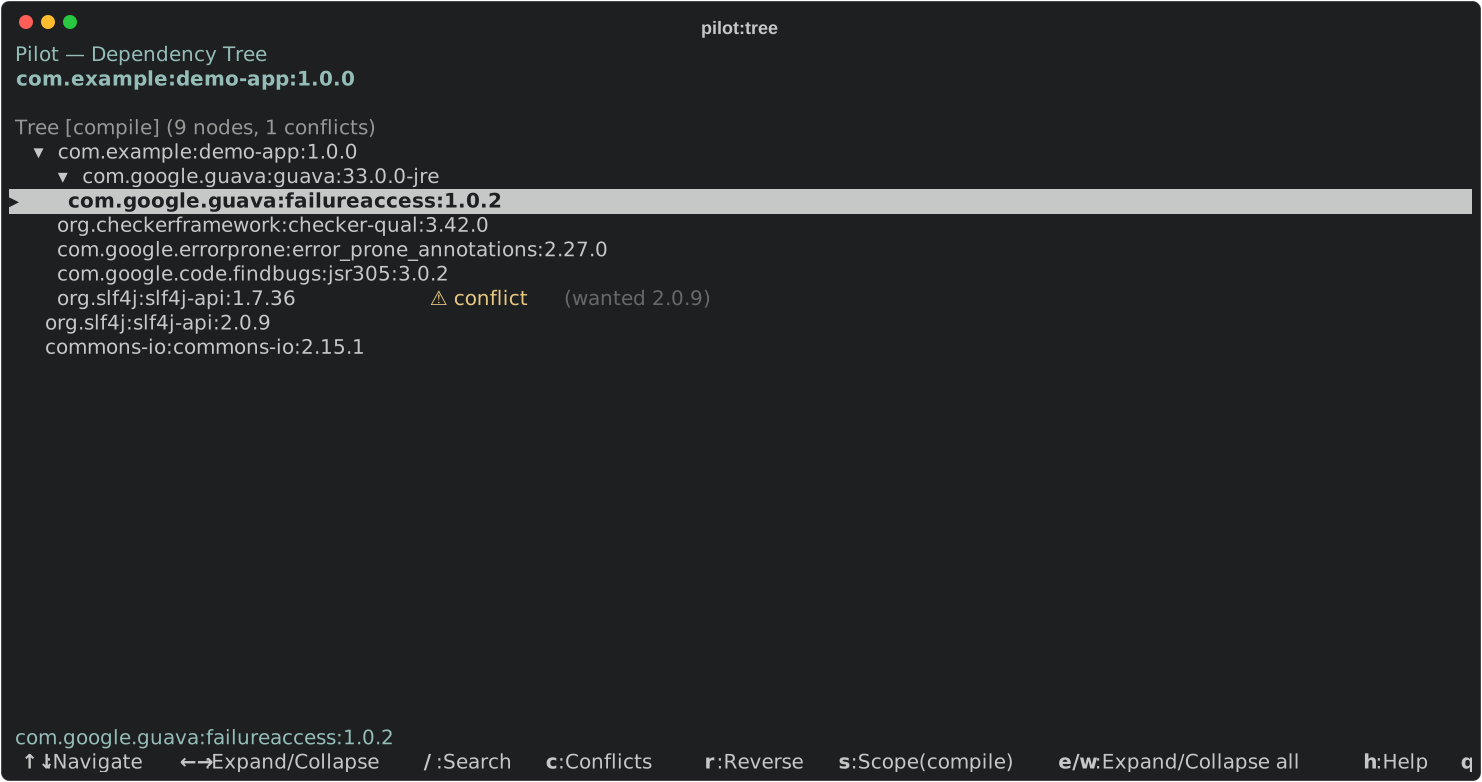
Dependency tree
Security audit

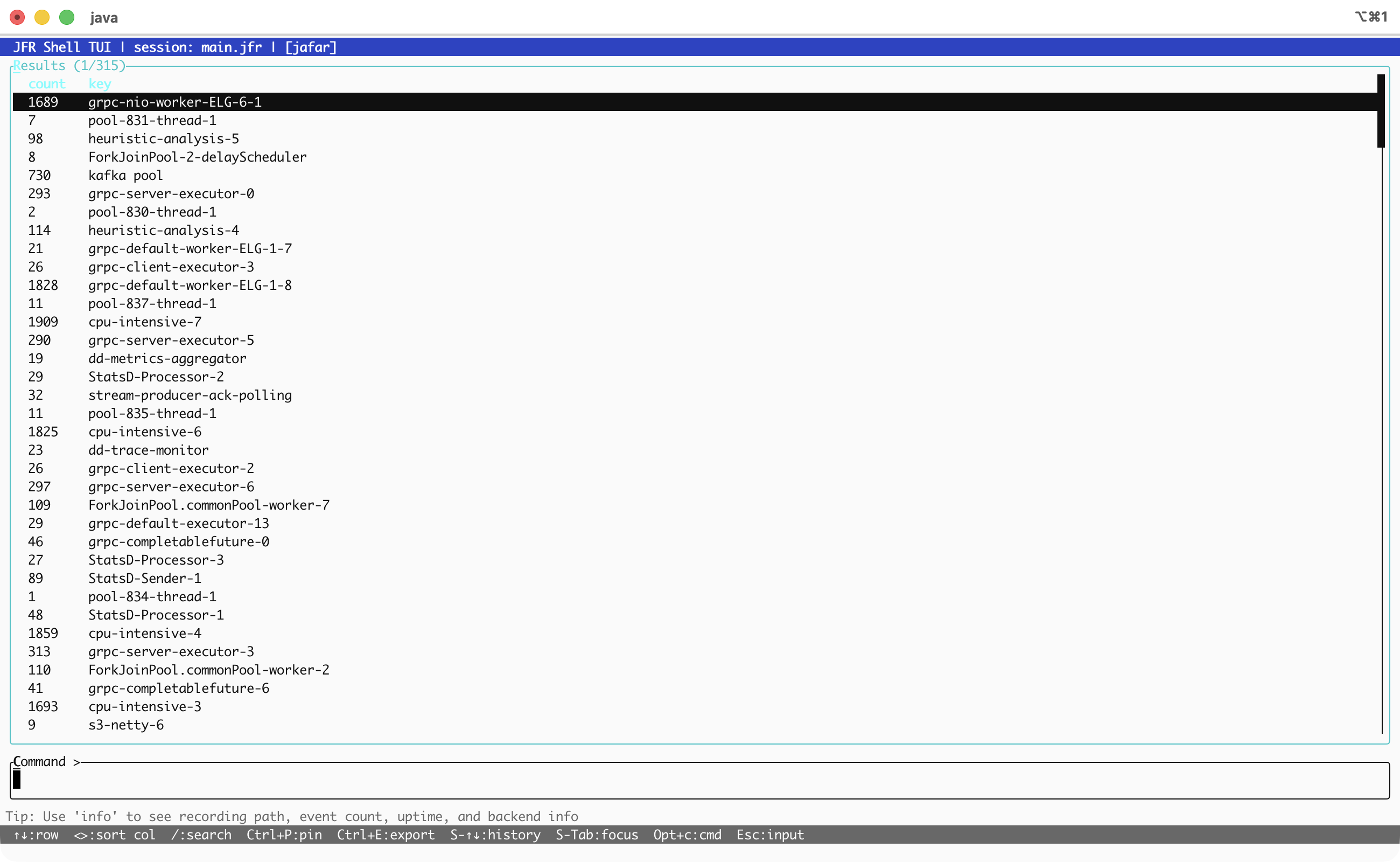
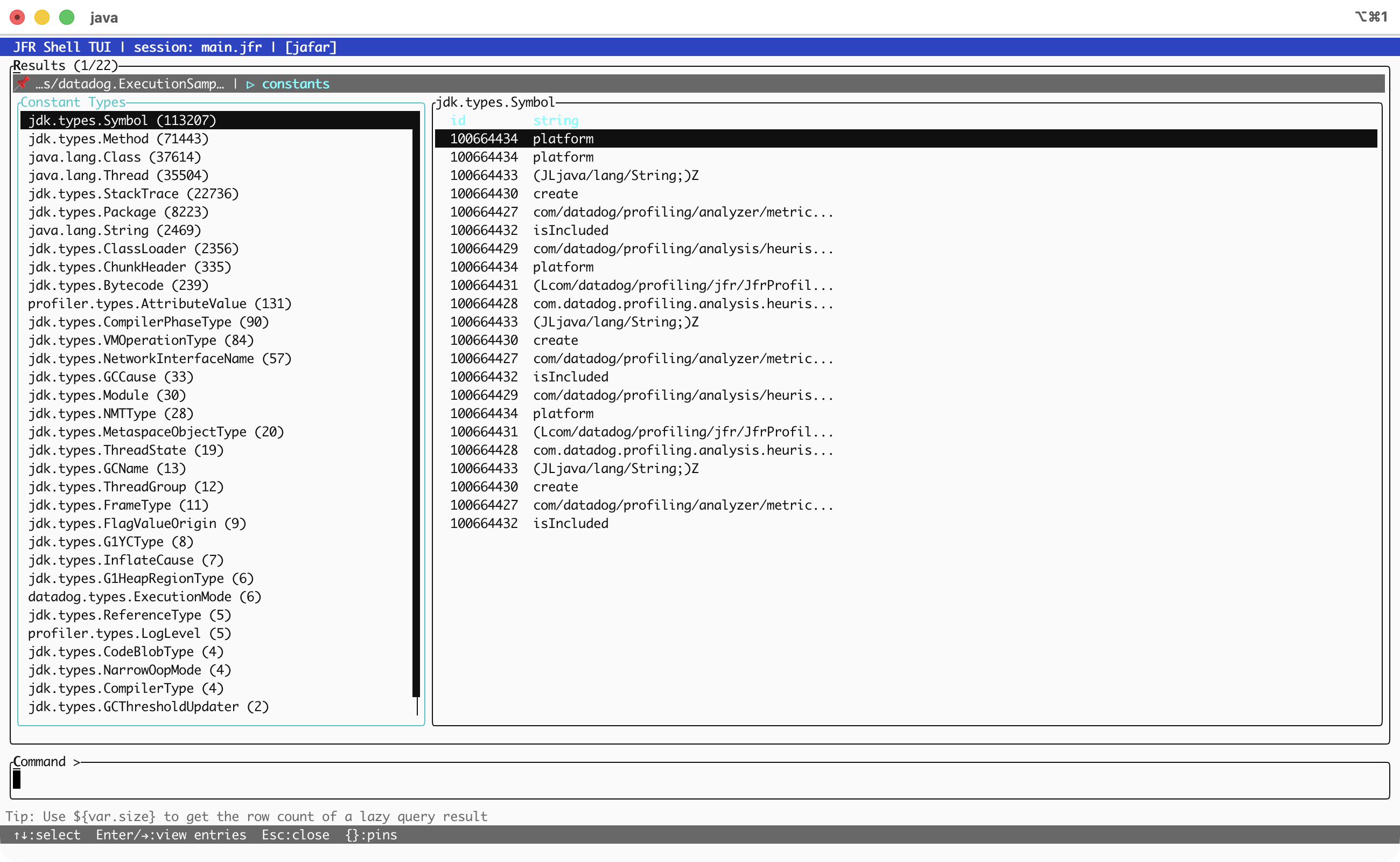
JFR Shell

JFR analysis without scroll hell.

jbang jafar-shell@btraceio --tui
  • Query JFR recordings in a full-screen TUI

  • Sort, filter, and inspect rows without losing context

  • Tabs, completion, history, export

JFR Shell overview
JFR Shell tree view

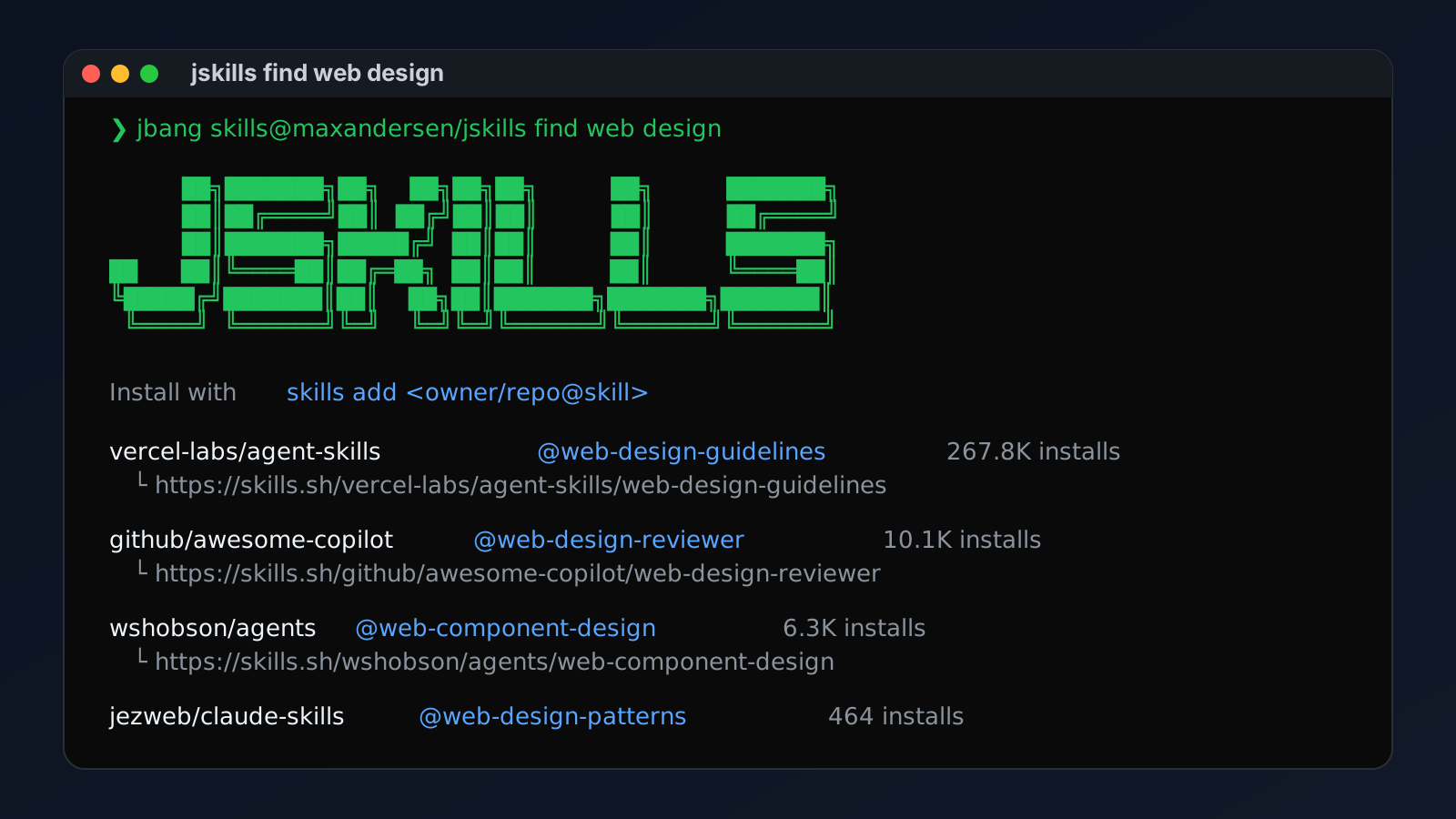
jskills

Discover and install agent skills.

jbang skills@maxandersen/jskills find
  • Search and install agent skills

  • No Node.js required

jskills find screen

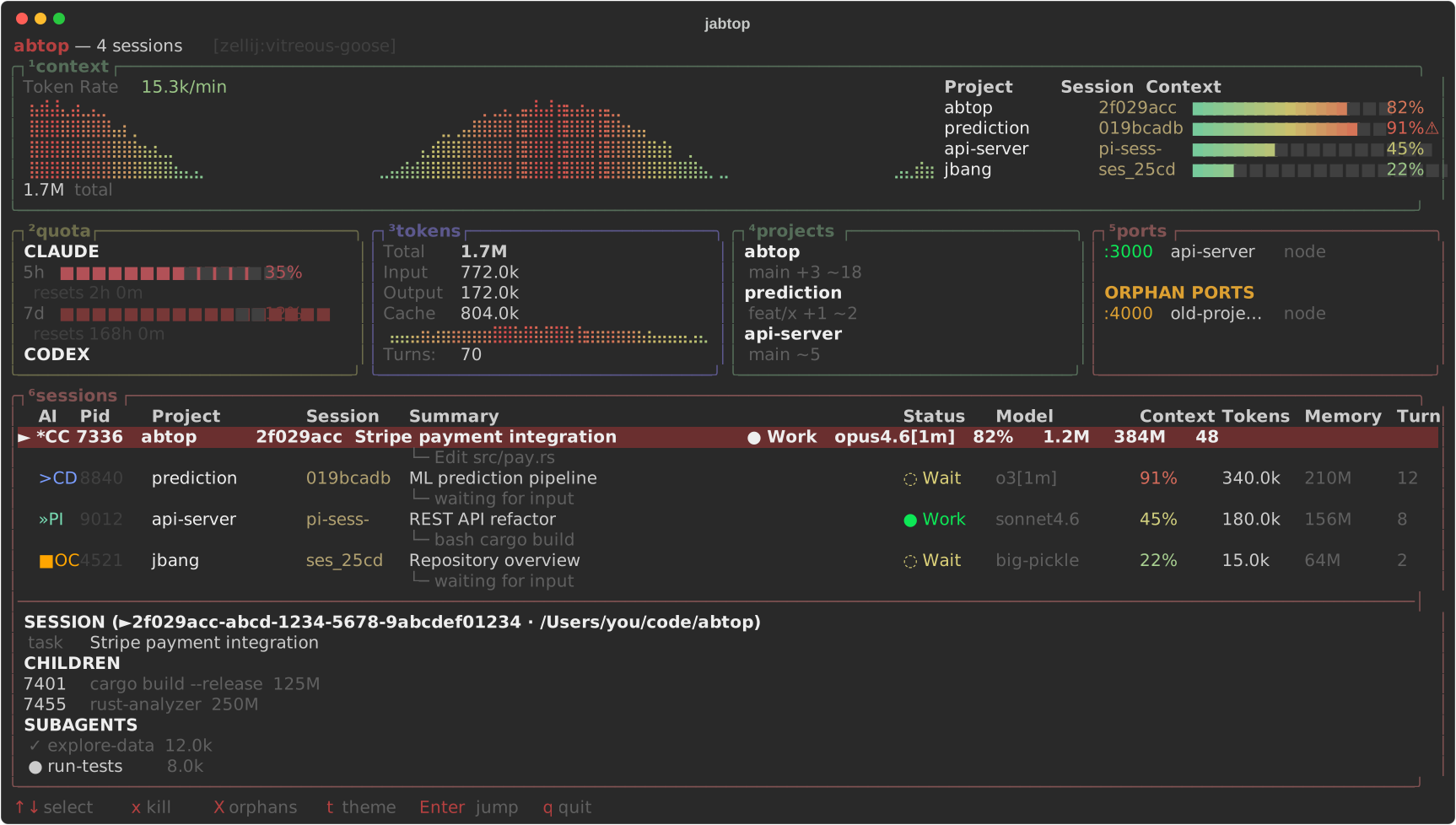
jabtop

AI agent monitor.

jbang app install abtop@maxandersen/jabtop
  • Claude Code, Codex CLI, pi.dev, opencode

  • Tokens, context, rate limits

  • Jump to tmux/zellij panes

jabtop screenshot

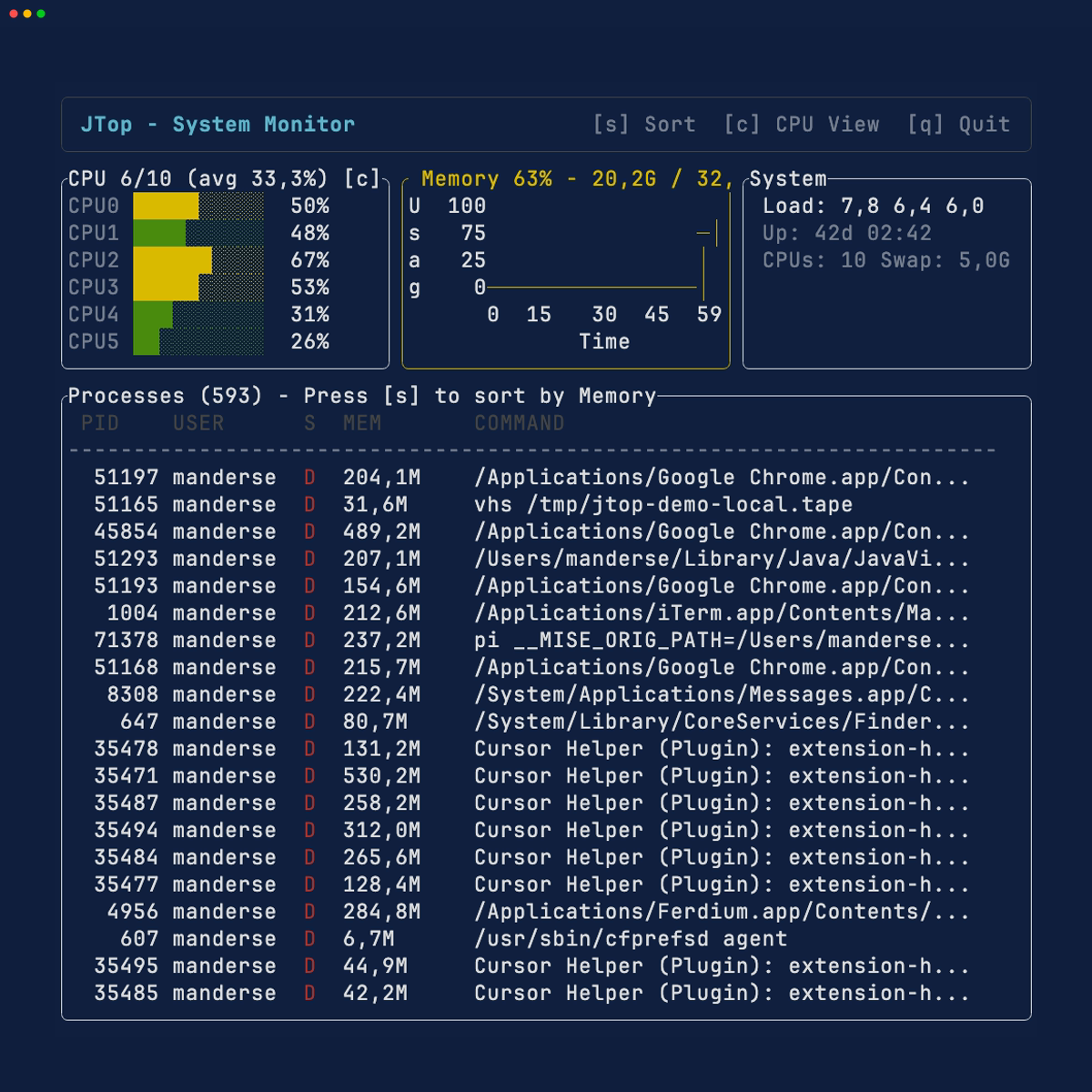
JTop

System monitor demo.

jbang jtop-demo@tamboui
  • CPU, memory, process list

  • Toggle views and sort modes

JTop demo

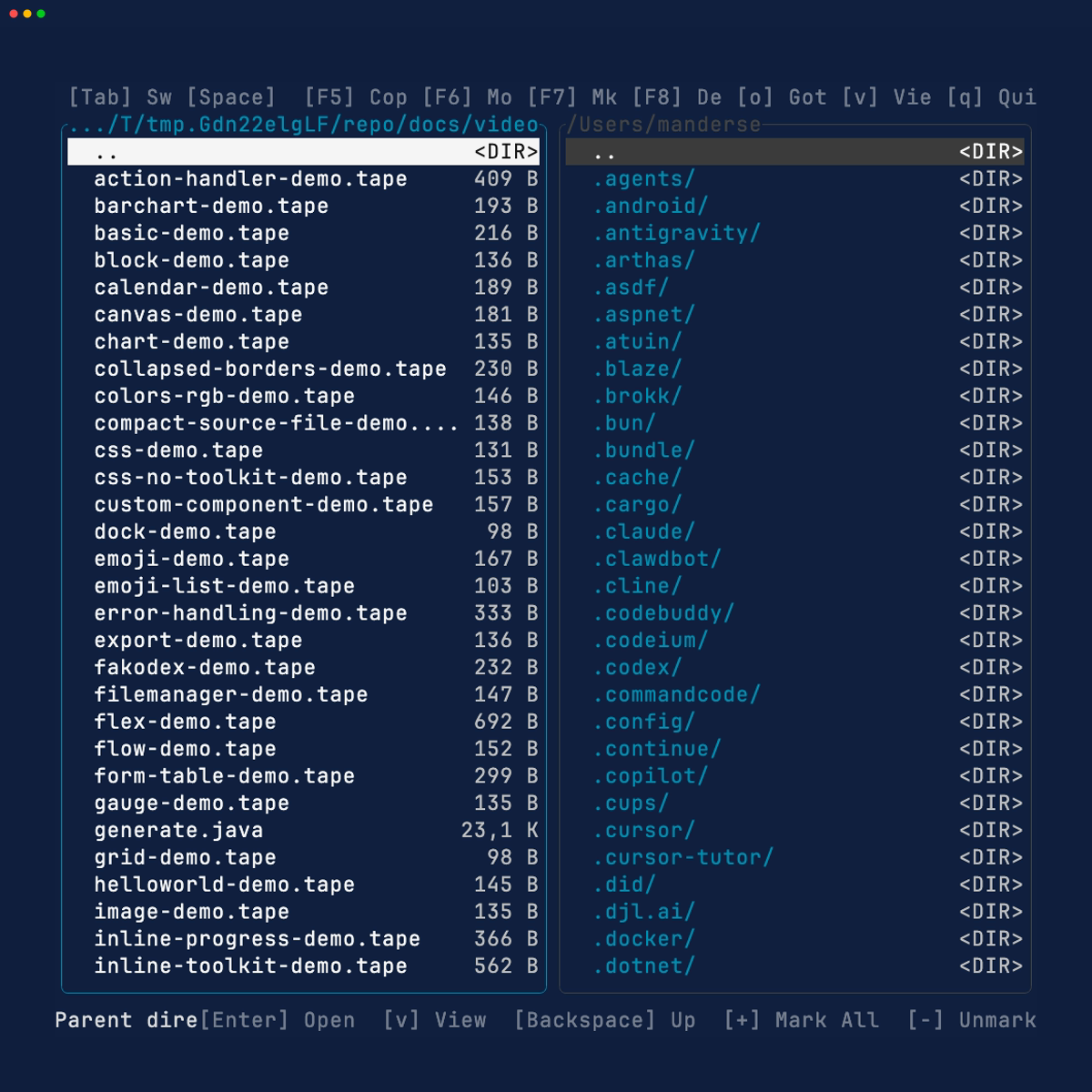
File manager

Two-pane file manager demo.

jbang filemanager-demo@tamboui
  • Two-pane, keyboard-driven UI

  • MVC architecture in practice

File manager demo

Try the demos

jbang demos@tamboui

That’s the whole installation. No setup. No version wrangling.
JBang handles everything.

Make 2026 the year of Java in the terminal

  • 🔨 Build something: a dashboard, a log viewer, an AI chat interface

  • 📝 Blog about it: show the world Java can do this

  • 🌍 Distribute it: JBang for quick runs, JReleaser for releases

  • Contribute: it’s experimental, APIs will change, feedback welcome

Questions?

Meet the TamboUI team: Paris 142, 17:00-18:30, today